

Add an attribute
An attribute adds to a resource a piece of data that the record’s fields do not cover: the load capacity of a forklift, the floor area of a workplace, the power of a machine. It is made of a name, a unit of measure and a value. See Material resources.
Attributes are available on workplaces, equipment, substances, PPE and PPE inventory entries, and also on offices and people.
Add a standard attribute
Section titled “Add a standard attribute”Standard attributes are a predefined list, with name and unit of measure already set, for example a capacity in litres or a volume in dm³.
-
Open the resource and choose the Attributes tab.
-
Open the New menu in the toolbar and choose Add standard attribute.
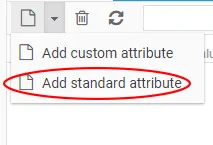
-
In the Select standard attribute window, choose the attribute. Code, name, description and unit of measure are filled in.
-
Enter the Value and save.
Add a custom attribute
Section titled “Add a custom attribute”When the attribute is not among the standard ones:
-
In the Attributes tab, open the New menu and choose Add custom attribute.
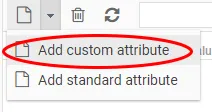
-
In the Attribute window, enter the Name, the Unit of measure and the Value, all required, and the Code and Description if needed.
-
Save.
The Value field accepts the type of data expected by the chosen unit of measure.
Edit or delete an attribute
Section titled “Edit or delete an attribute”- To edit it, double-click the attribute’s row.
- To delete it, select it and click the Delete icon (a bin) in the toolbar.
This site is protected by reCAPTCHA and the Google Privacy Policy and Terms of Service apply.