

Office groups
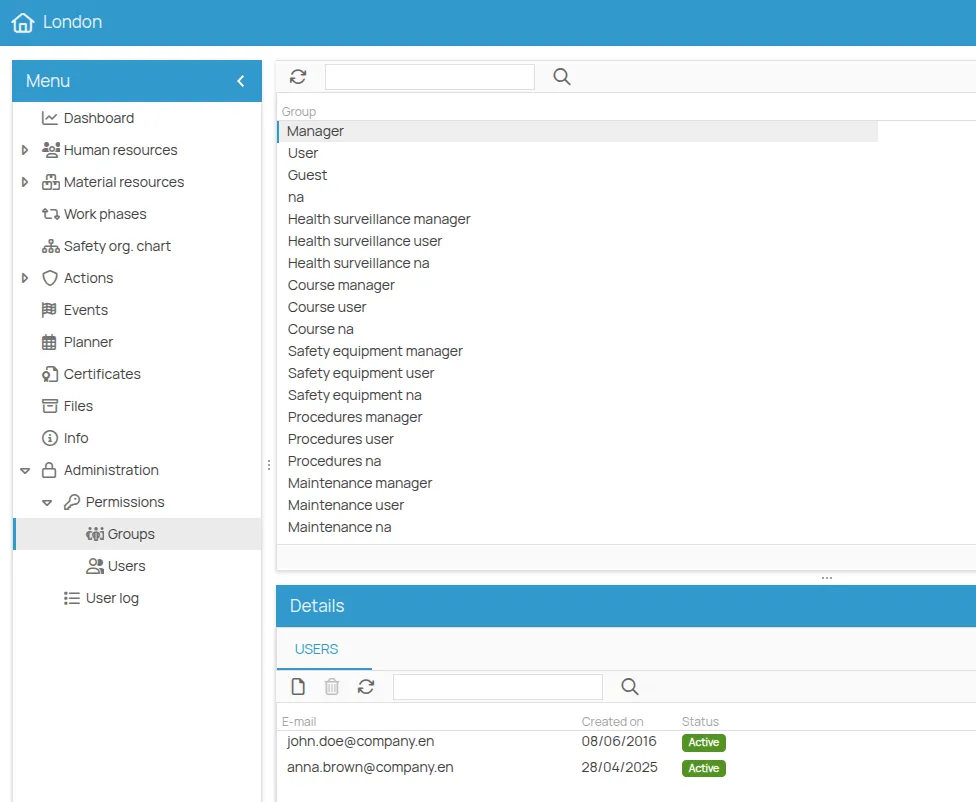
The office is the operational entity: permissions here delegate responsibility to the teams and people who work in a given location. Groups come in two families.
Generic roles
Section titled “Generic roles”They govern access to the whole office.
| Group | Permissions on the office |
|---|---|
| Manager | Read and write · can change data, add and remove users, view reports. Adding and removing users is only possible if also a Project admin. |
| User | Read only on the office data |
| Guest | Limited access to some sections: Human resources, Material resources, Work phases, Safety organisation chart, Actions |
| NA | No access to the office data |
Area roles
Section titled “Area roles”They apply to one functional area only, and are how you create specialists.
| Area | Groups |
|---|---|
| Training | Training manager · Training user · Training NA |
| Health surveillance | Health surveillance manager · user · NA |
| Personal protection | Personal protection manager · user · NA |
| Procedures | Procedure manager · Procedure user · Procedure NA |
| Maintenance | Maintenance manager · Maintenance user · Maintenance NA |
In every area, manager means full control over the actions of that area and access to their related data, user means read only, NA means no access.
What propagates
Section titled “What propagates”| Office role | Action role | Person role |
|---|---|---|
| Manager | Manager | Manager |
| User | User | User |
| Guest | User | User |
| NA | NA | NA |
To assign them, see Set permissions.
This site is protected by reCAPTCHA and the Google Privacy Policy and Terms of Service apply.