

Public verification
A third party — an inspector, a supervisor, a client, a contractor’s foreman — scans the QR with their phone. Their browser opens a read-only public page, without needing a 4HSE account, which recalculates and shows the permit’s up-to-date status.
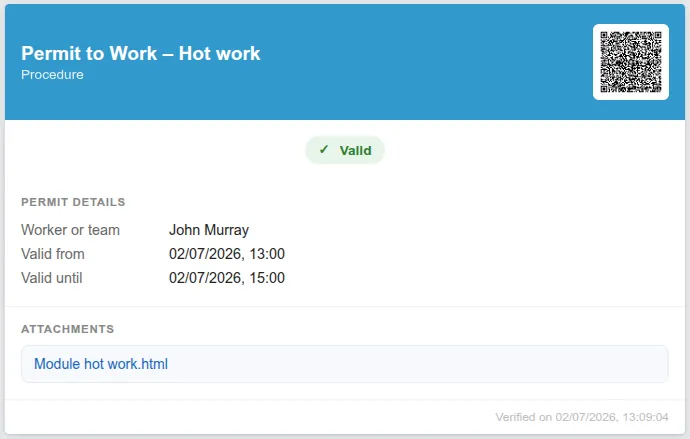
What the page shows
Section titled “What the page shows”| Header | the permit name and the type of activity, next to the QR |
| Status | with a coloured badge: Valid in green, Expired in red, Revoked, Rejected or Draft |
| Permit details | the worker or team, and the Valid from / Valid until window |
| Attachments | for example the completed hot work form, which can be opened from the page |
| Verified on | the date and time the page was consulted |
The page is shown in the browser language of whoever consults it, falling back to English. Italian, English, German, Spanish and French are available. No sensitive data is shown.
Why the status is always current
Section titled “Why the status is always current”The status is recalculated in real time. If the permit has expired — past its two hours — or has been revoked, the next scan shows it immediately.
This is the difference from a paper permit, which can only state that it was valid when it was printed. The QR answers the question that matters on site: is this permit valid right now?
Security and privacy
Section titled “Security and privacy”The model is designed to be safe to hand around:
- the verification link is signed and has a limited lifetime: it is not a guessable address, and it stops working when it expires;
- the QR does not expose internal identifiers or sensitive data;
- when the link has expired, you generate a new QR from the certificate detail.
This is consistent with the GDPR principles of data minimisation, purpose limitation and security.
This site is protected by reCAPTCHA and the Google Privacy Policy and Terms of Service apply.