

AI in 4HSE
The artificial intelligence integrated into 4HSE is a virtual assistant available 24/7 inside the platform. Through ordinary conversation you can ask it to retrieve information, carry out operations in the system, and get advice on regulatory and technical matters.
Where it lives
Section titled “Where it lives”In the main 4HSE bar, at the bottom right, a chat icon opens the assistant window. Previous conversations are listed on the left, the active one on the right, and the credit usage is shown at the bottom left.
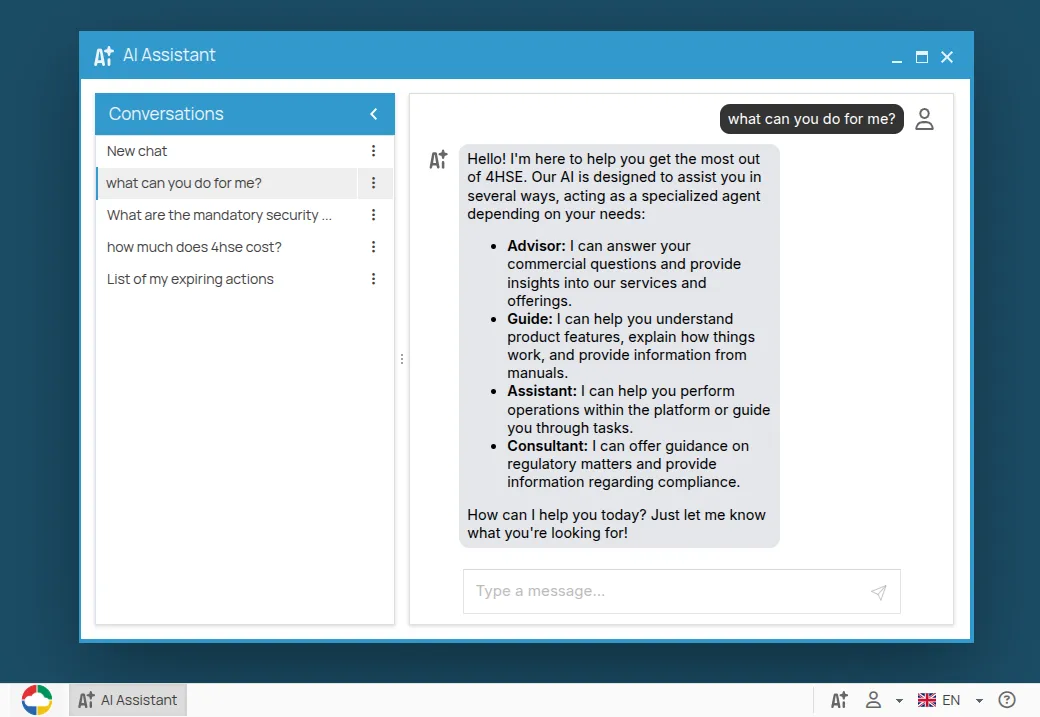
One assistant, several agents
Section titled “One assistant, several agents”You never choose which specialist to talk to. The AI analyses the question and routes it to the agent best suited to answer: the one that operates on your data, the one that explains the interface, the one that answers on regulations, and so on. The full list is in The agents.
Inside 4HSE, or from your own AI client
Section titled “Inside 4HSE, or from your own AI client”The assistant inside 4HSE is one way in. The other is the MCP server, which lets external clients — Claude, ChatGPT, automation platforms — work on your 4HSE data from outside. The operations are the same; what changes is where you are typing. See Connect an AI client.
Unlike the integrated chat, MCP is free for all 4HSE users and not restricted to the beta.
There is a third surface, inside the records: where a text field shows a wand icon, the AI writes its content from the data already filled in. See Generate the text of a field.
How to ask
Section titled “How to ask”- Use natural language. The AI knows the names of your people, projects, sites and resources: “Search for Mario Rossi in the MyCompany project” works.
- Be specific when it matters. “Show me the certificates expired in the last 30 days at the Milan site” is more useful than “Show me the certificates”.
- Lean on the context. It remembers the current conversation, so “list them by name only” works as a follow-up.
- Follow the logical order. For complex operations, do things in the order the product does them: create roles and jobs first, then profile people into them.
- Verify what matters. For critical decisions, check the result in the interface.
This site is protected by reCAPTCHA and the Google Privacy Policy and Terms of Service apply.